 Lịch Âm Việt
Death Anniversary (Giỗ) Reminder by Lunar Date Every Year
· 5 min read
A giỗ is the yearly anniversary of a family member’s death, observed on the lunar date with a meal and offerings at the family altar. Because the lunar calendar doesn’t line up with the solar one, the giỗ falls on a different solar date every year. If you live abroad, far from the relatives who usually remember, it is very easy to miss.
The reliable fix is to enter the lunar date once in a calendar that repeats by the lunar calendar, choose how early to be reminded, and let your phone handle it.
Why a normal yearly repeat doesn’t work
Say your grandfather’s giỗ is on the 10th day of the 9th lunar month. Here is where that lands on the solar calendar:
| Year | Solar date |
|---|---|
| 2026 | Monday, 19 October 2026 |
| 2027 | Saturday, 9 October 2027 |
| 2028 | Friday, 27 October 2028 |
| 2029 | Wednesday, 17 October 2029 |
| 2030 | Sunday, 6 October 2030 |
Across these five years the date moves within a three-week window. A “repeat every year” in a regular calendar app keeps the same solar date, so it is already wrong in year two.
Add a giỗ with Lịch Âm Việt
Lịch Âm Việt works on Android, iPhone and iPad, Mac, Windows and the web. The app’s labels are shown here in Vietnamese with an English gloss; you can also switch the whole app to English.
- Open the app and tap + at the bottom right.
- Choose Ngày giỗ (death anniversary). The other types are Sinh nhật (birthday), Sự kiện Dương lịch (solar-date event) and Sự kiện Âm lịch (lunar-date event).
- In Tên sự kiện (event name), type something clear, such as “Giỗ ông nội” or “Grandpa’s giỗ”.
- Under Lịch (calendar), pick where to save it (see below).
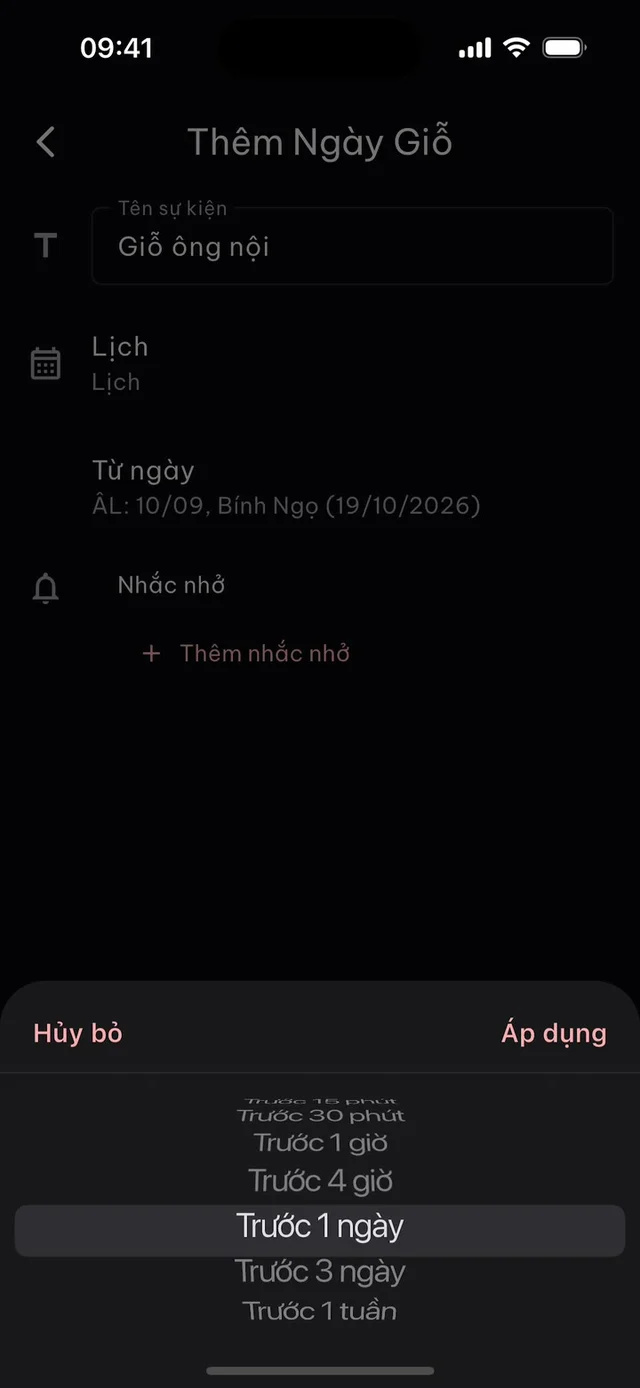
- Tap Từ ngày (date). The picker switches between Dương (solar) and Âm (lunar): enter the lunar date if you know it, or the solar date of the day the person died and let the app convert it. The line underneath shows both, for example “ÂL: 10/09, Bính Ngọ (19/10/2026)”.
- Tap Thêm nhắc nhở (add reminder), choose when, and tap Áp dụng (apply).
- Tap Thêm (add) to save.
That’s it. A giỗ always repeats yearly by the lunar date; the app creates one event for each year, many years ahead.
Choosing when to be reminded
The reminder options are:
- Không nhắc nhở: no reminder
- Trước sự kiện: at the time of the event
- Trước 5 / 15 / 30 phút: 5, 15 or 30 minutes before
- Trước 1 giờ / 4 giờ: 1 or 4 hours before
- Trước 1 ngày / 3 ngày / 1 tuần: 1 day, 3 days or 1 week before
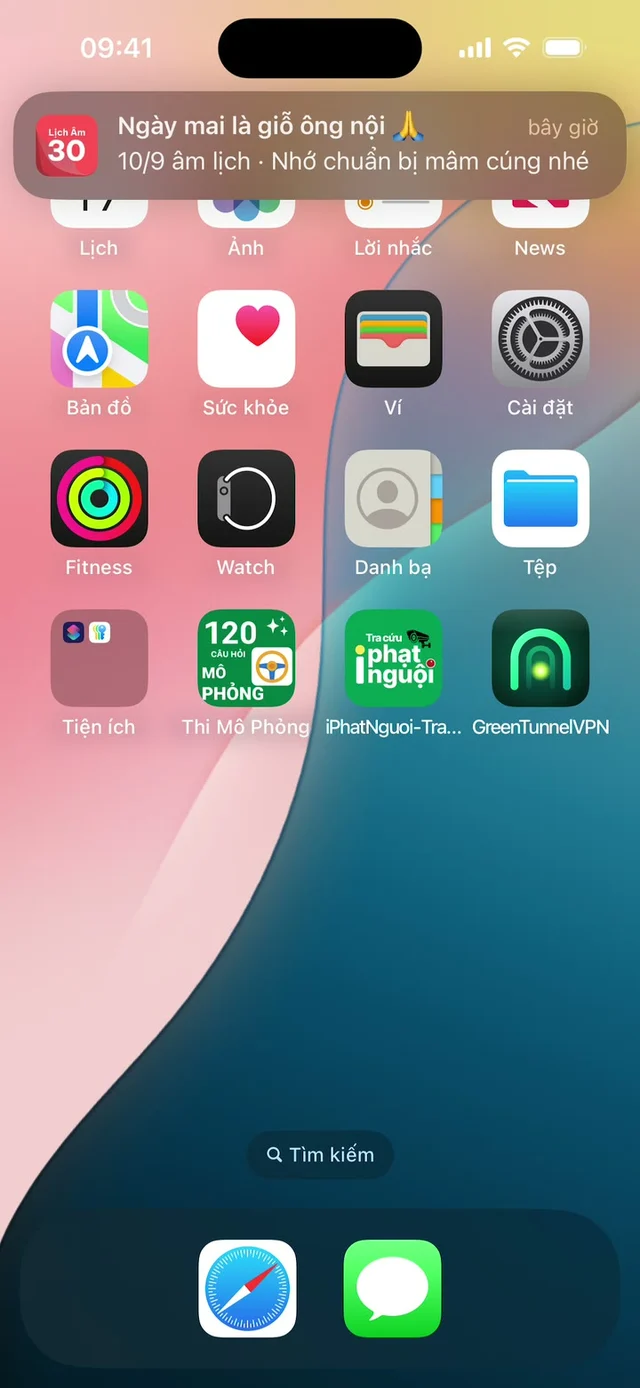
A giỗ is an all-day event, so Trước 1 ngày fires at midnight at the start of the day before. Some practical choices:
- You cook the meal at home: Trước 1 tuần to plan, plus Trước 3 ngày to shop.
- You call or video-chat relatives in Vietnam: Trước 1 ngày, and remember the time difference.
- You fly home for an important giỗ: Trước 1 tuần at minimum, and add the next few years’ dates to your travel planning.
You can add several reminders to one event: up to 5 in a Google or Android calendar, 2 in an Apple (iCloud) calendar, 1 in a Microsoft calendar.
Where the event and the reminder live
Lịch Âm Việt doesn’t keep events in a private store. It writes them into the calendar you choose:
- Android, iPhone, iPad, Mac: your device calendar, meaning the Google, iCloud or Exchange accounts in your system settings, or a calendar on the device.
- Windows and Web: a Google or Microsoft (Outlook) account linked inside the app.
The reminder is sent by that calendar. If it doesn’t arrive, check that your phone’s Calendar app, Google Calendar or Outlook is allowed to send notifications. On some Android phones you also need to relax battery settings; see Xiaomi, OPPO and vivo. The Linux version can show events but can’t create them.
Share it with the whole family
If only one relative keeps track of the dates, the family depends on that person remembering. A shared calendar fixes that:
- One person creates a shared calendar, for example a “Family” calendar in Google Calendar shared with everyone, or an iCloud family calendar.
- Each person adds that account in their phone’s settings (Android, iPhone, Mac) or links it in the app (Windows, Web).
- When adding a giỗ, choose that shared calendar under Lịch.
Now everyone sees the same giỗ dates, in Vietnam or abroad, and each person sets their own reminders.
See upcoming anniversaries
Open the Sự kiện (events) tab. It lists upcoming events from all your calendars together with holidays, each with Còn N ngày (N days left). Giỗ entries carry the label Lặp lại hàng năm (repeats yearly). Filter with Tất cả / Dương lịch / Âm lịch (all / solar / lunar), or type “giỗ” in the search box.
Tips
- Include the relationship in the name, for example “Giỗ bà nội (Dad’s mother)”, so younger relatives know who it is.
- Giỗ in the 12th lunar month often falls in January or February of the next solar year. For example, the 23rd day of the 12th month of Bính Ngọ is 30 January 2027.
- Not sure of the lunar date? Use the solar to lunar converter (in Vietnamese).
- Shared holidays such as mùng 1 (first of the lunar month), rằm (full-moon 15th), Tết and Vu Lan don’t need to be typed in: tap the bell icon, open Cài đặt nhắc (reminder settings) and switch them on.
Why the Vietnamese date can differ from a Chinese lunar calendar in some years is explained in Vietnamese vs Chinese lunar calendar.
FAQ
Why can't I just set a yearly repeat in Google Calendar or Apple Calendar?
Those repeat on the same solar date. A giỗ follows the lunar date, which moves by up to several weeks from one year to the next, so a solar repeat drifts off the real day after the first year.
Do I need to enter the giỗ again every year?
No. Lịch Âm Việt's Ngày giỗ (death anniversary) type always repeats by the lunar date. The app creates one event per year for many years ahead, each on the matching solar date.
I only know the solar date when the person passed away. What now?
Switch the date picker to Dương (solar) and pick that date; the app converts it to the lunar date. You can also convert it on the solar to lunar converter page on lichamviet.com (in Vietnamese).
How do I make sure the whole family gets the reminder?
Save the giỗ into a shared family calendar, such as a shared Google calendar or iCloud family calendar. Everyone the calendar is shared with sees the event on their own phone.
Does the date change if I live outside Vietnam?
No. The lunar date is computed with Vietnam's calendar, the same one your relatives in Vietnam use, and saved as an all-day event on that solar date.
 lichamviet.com